


Customer Support
Dedicated customer support to assist you at every step from installation to daily use.
Customer Support
Customer Support is moved to our platform PEXit (https://pexit.net) from the conventional email system for better security and tracking. Users can post all support queries to PEXit.
Your Support Query posted to PEXit is visible only to you and the Support Team and NOT to all other PEXit users. In effect, PEXit Customer Support is a private communication and is NOT made public.
Instructions for posting your New Support Queries and Additional Queries related to Previous Support Queries are given below.
Evaluation User: Ensure your subject line says: EVALUATION USER.
Steps for Posting New Support Query
Launch PEXit using Internet Browser by entering the URL as https://pexit.net or Download the Android App through Google Play or iOS App through Apple Store.
Sign up with PEXit or login using your existing Gmail / Facebook account .
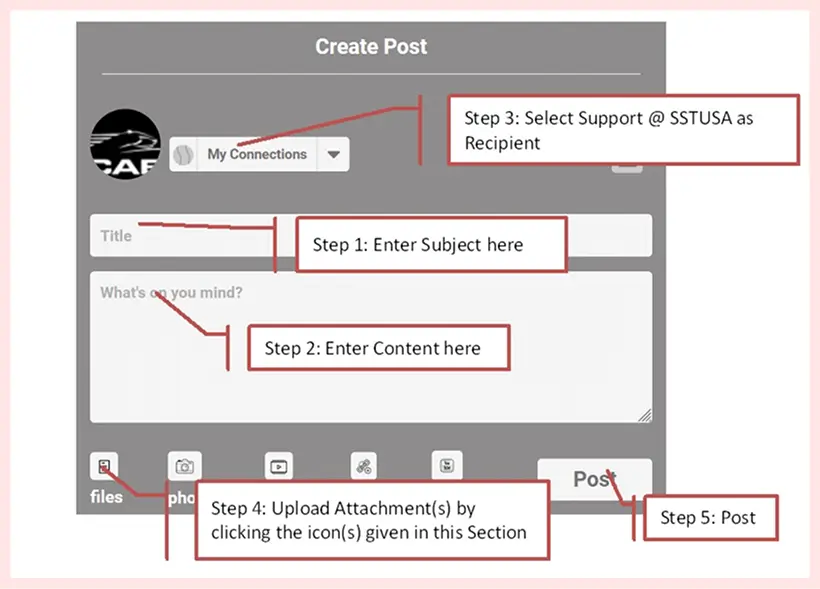
From the Dashboard, post your New Support Query as shown below. For queries related to CAEPIPE, please include your CAEPIPE serial number, CAEPIPE .mod file(s), relevant information to your question such as screenshot(s), document(s), etc.
Upon posting, PEXit will generate a Ref. ID for your post as shown in the snap shot below.
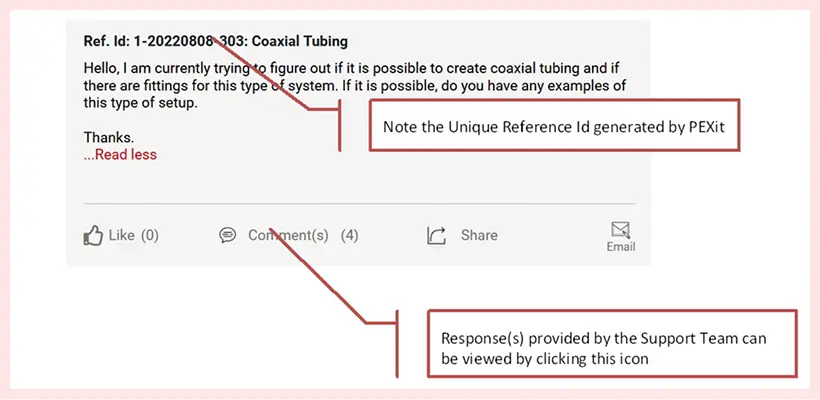
The Support Team will post their response in the "Comment" section generally within one (1) work-day and notify you (the query originator) with a PEXit message as well as through an email to your email id registered with PEXit. Message can be viewed by clicking the icon as shown below.

To locate your specific support query, enter the keyword "Ref. Id" in the "Search box" and press the search icon OR select the name "Support @ SST USA" through "View your posts to > Individuals" to see all your posts to "Support @ SST USA".
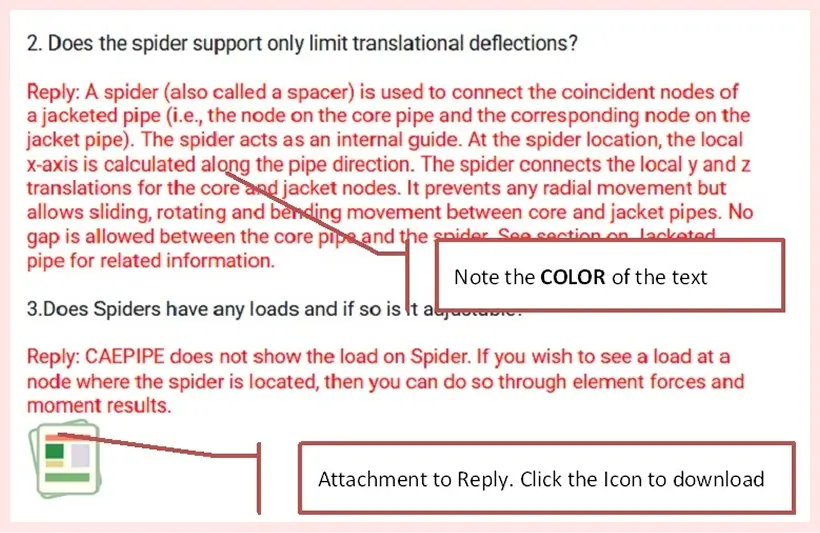
Your post as well as response from Support Team could include basic formatting such as BOLD, Italics, Underline, Colored Text, etc. See figure below. For details on basic formatting, see Point 10 of "Support" section of PEXit.
Steps for Posting an Additional Query to a Previous Support Query
- Launch PEXit using Internet Browser by entering the URL as https://pexit.net or Download the Android App through Google Play or iOS App through Apple Store.
- Login to PEXit using your existing PEXit / Gmail / Facebook account.
- In the Dashboard, navigate and locate your previous post by entering the keyword "Ref. Id" in the "Search box" and press the search icon OR by selecting the name "Support @ SST USA" through "View your posts to > Individuals" to see all your posts to "Support @ SST USA".
- In your previous post, click on the "Comment" icon to expand the section and add your additional Support Query as a "New Comment". Include your supporting model or file(s), relevant information to your question such as screenshot(s), document(s), etc.
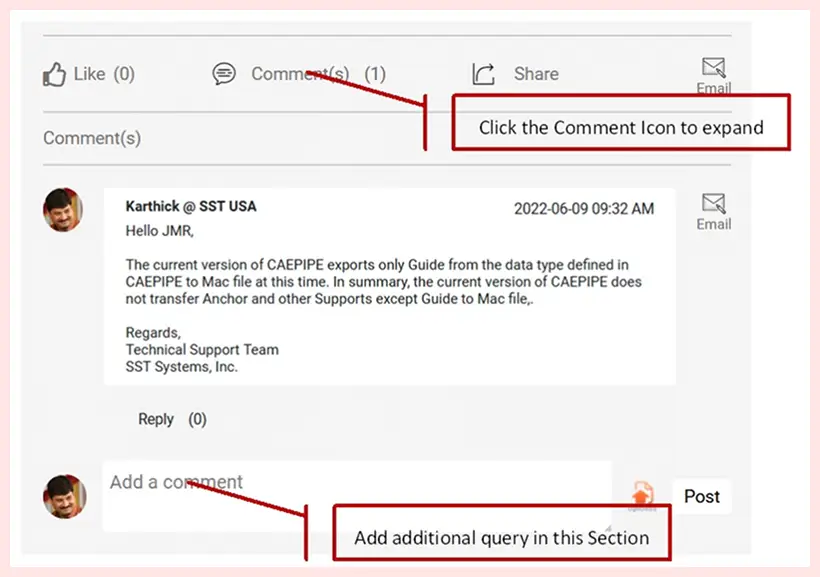
The Support Team will post their response in the "Comment" section generally within one (1) work-day and notify you (the query originator) with a PEXit message as well as through an email to your email id registered with PEXit. Message can be viewed by clicking the icon as shown below.
Sales
For sales, please send us an email sales@sstusa.
General Inquiry
For general inquiry, please send us an email to [email protected].
Our Philosophy
Quite simply, we want to meet and exceed your expectation in a timely manner. We are committed to enhancing and maintaining our products and relationships with our clients.
Helpful Links
What's our customer says?

I cannot think of a situation when we needed a pipe analysis that CAEPIPE could not do.

Brent Thomas
Thomas Engrg CAEPIPE user for over 20 years
CAEPIPE is the best program I have used - Exceptional Versatility.

Late Daniel Mroz
President, Mroz Mechanical, Madison, IN.
The new graphics rendering feature in CAEPIPE v5 is fantastic. It far exceeds the graphics of any other piping stress analysis program I have seen.
Ed Patnode
Advanced Thermal CAEPIPE user for over 15 years
I ran through the complete model tutorial on the web's online trial version. It [CAEPIPE] was one of the best trial versions I have ever seen, including any and all other types of different tutorials I've tried in the past.
Gary T
Daview Engrg. LA