


NSP_HOST Configuration
Set the NSP_HOST environment variable to the IP address or hostname of the computer where the CAEPIPE hardware key (license server) is located.
NSP_HOST Configuration
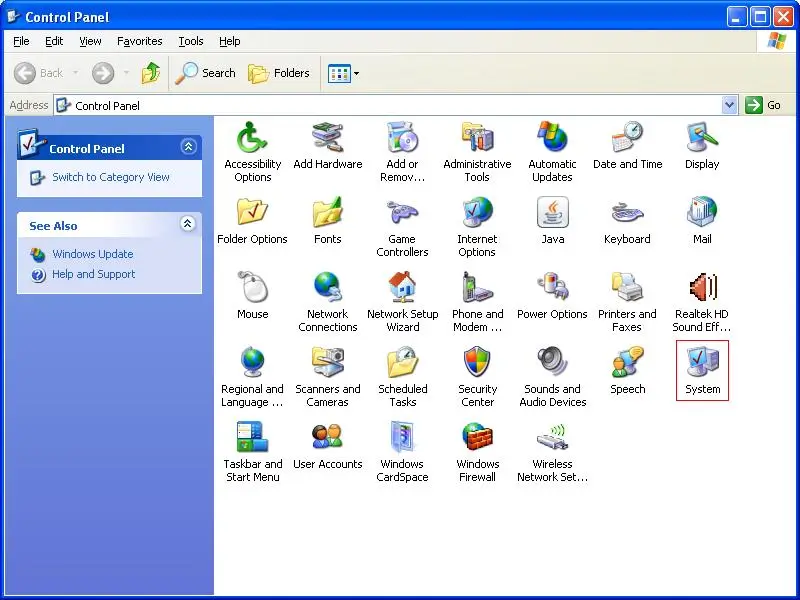
Open Control Panel
Open the Control Panel and double-click on the System icon.
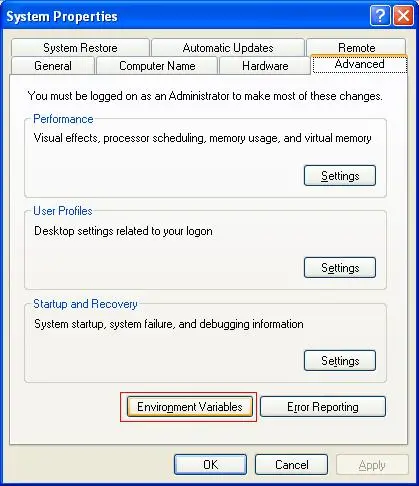
Go to Environment Variables
After opening the System Properties window, select the Advanced tab.
Next click on the Environment Variables button.
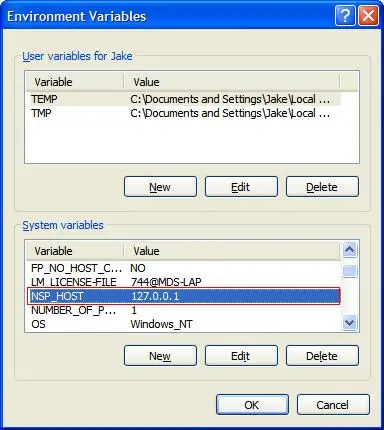
Add NSP_HOST Variable
After opening the Environment Variables window, add a new System Variable.
Enter "NSP_HOST" in the Variable field.
Enter the IP Number/Hostname of the computer on which the hardware key resides on in the Value field. In some environments, specifying an IP address works (and not the Hostname). If using a hostname (fully qualified), be sure to flush your DNS cache and/or restart the DNS service, if working across subnets.
If the hardware key resides on the same computer as CAEPIPE, for your IP Number/Hostname, use one of the following:
localhost
A static IP Number (check with your Network Administrator).
Prefer specifying the IP address, not the hostname.